If something isn't displaying correctly or isn't working as expected, please try the following before contacting our team.
1
Test in Incognito / Private mode
Open a private browsing window and access the system again to check whether the issue persists.
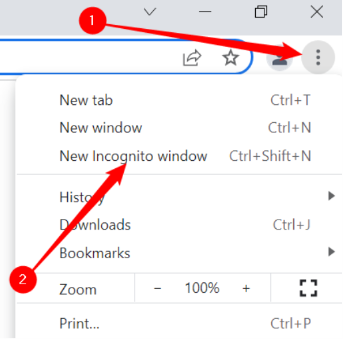
Chrome: click the three-dot menu (top right), then select New Incognito Window.
Other browsers: look for “New Private Window” or a similar option.
Chrome: open the three-dot menu, then choose New Incognito window.
What the result tells us
If the issue does not occur in private mode, it is most likely caused by cached data — please continue to Step 2.
If the issue still occurs, please contact support and mention that you tested in private mode.
2
Clear your browser cache
If the issue disappears in private mode, clearing your cache should resolve it.
Open your browser settings.
Go to Privacy & Security.
Select cached images and files, and clear them.
Reload the system and confirm the issue is resolved.
Why does this happen?
We release updates to the platform frequently. Occasionally your browser may continue to display a previously stored version of the system. The steps above ensure that you are always viewing the latest version.
Still need assistance?
If the issue continues after completing these steps, please contact our team and include the following:
A brief description of the issue.
Confirmation that you tested in Incognito / private mode.
Screenshots or a screen recording, if possible (a short Loom video is especially helpful).
Please also cc clark@fastcloud.com on your email so that we can investigate and resolve the issue as quickly as possible.